
Filter results
You can narrow down the results using the filters
Audience
Topics
Our work
Diseases
11947 results
-

National Implementation Oversight Group – February Communique 2026
The Designated Registered Nurse Prescribing National Implementation Oversight Group meets regularly to guide the roll-out of designated RN prescribing. -

National Implementation Oversight Group – December Communique 2025
The Designated Registered Nurse Prescribing National Implementation Oversight Group meets regularly to guide the roll-out of designated RN prescribing.
-

NDIS Reform Advisory Committee Meeting Summary – 4 September 2026
This meeting summary is for the NDIS Reform Advisory Committee meeting held on 7 August 2026. -

Frequently asked questions for applicants – Private Hospital Stream (PHS) – Expression of Interest (EOI) Internships 2027
These FAQs provide more information to applicants applying for Postgraduate Year (PGY) 1 funded places under the 2027 PHS EOI recruitment process. -

Schedule of Subsidies and Supplements for Residential and Transition Care
The schedule lists the daily rates of subsidies and supplements for government-funded residential and transition care under the new Aged Care Act 2024, which commenced 1 November 2025. -

Private Health Chief Executive Officer Forum – Terms of reference
The terms of reference outline the scope of the Private Health Chief Executive Officer Forum. -

Private Health CEO Forum – 21 September 2026
The Private Health Chief Executive Forum Meeting Summary provides a summary of the agenda, discussion and presentations from its meeting of 21 September 2026. -

Webinar 16: Multi-Purpose Service – Aged Care Reforms: Impacts on the MPSP and providers – Presentation slides
Presentation slides from Webinar 16: Multi-Purpose Service Program (MPSP) – Aged Care Reforms: Impacts on the MPSP and Providers held on 14 September 2026. -

My QuitBuddy privacy notice
Information about collection of your personal information on this app. -

Multi-Purpose Service Program (MPSP) Direct Care Minutes Targets Trial Guide
This guide supports Multi-Purpose Services (MPS) participating in the next phase of the Direct Care Minute Targets trial from 1 October 2026. This phase will test direct care targets and reporting arrangements across MPS settings. -

Outcomes from Sector Support and Development Survey – Service provider insights
This report summarises feedback received through the survey. It required extensive data validation, analysis, and quality assurance to ensure the findings were accurate and robust. -

Joint report on MRFF and NHMRC funding from 2021-22 to 2024-25
This report outlines Medical Research Future Fund and National Health and Medical Research Council (NHMRC) funding from 2021-22 to 2024-25. This is a joint Department of Health, Disability and Ageing and NHMRC report. -

ATAGI pre-submission advice for industry sponsors wishing to make a PBAC submission
Cost recovery arrangements commenced on 1 July 2020 for Australian Technical Advisory Group on Immunisation (ATAGI) evaluation that supports Pharmaceutical Benefits Advisory Committee (PBAC) consideration of vaccines for the National Immunisation Program (NIP). -

Council of Elders Communique – 5 and 6 August 2026
This communique summarises the Council of Elders’ August 2026 meeting, highlighting discussions on ageing well, aged care reforms, access to services, price transparency, Support at Home, and First Nations engagement. -

Cervical screening resources for health practices or clinics
These resources can be used in health practices or clinics to promote cervical screening and provide more information to patients. -

ATAGI statement on the Clinical use of the Dengue vaccine Qdenga for Australians
Australian Technical Advisory Group on Immunisation (ATAGI) advice regarding the Clinical use of QDenga for Australians. -

Support at Home Payment Integrity Rolling Review – Cycle 1 summary report
This report outlines the findings and outcomes of Cycle 1 of the Support at Home Payment Integrity Rolling Review, which assured pricing transparency, evidence of delivery and compliance with monthly statement requirements. -

2025–26 Annual Prudential Compliance Statement (APCS) Guidelines
This resource provides guidance for residential aged care providers completing the Annual Prudential Compliance Statement -

Multi-Purpose Services Program (MPSP) – Annual Activity Report (AAR) User Guide
Multi-Purpose Services Program (MPSP) – Annual Activity Report (AAR) User Guide -
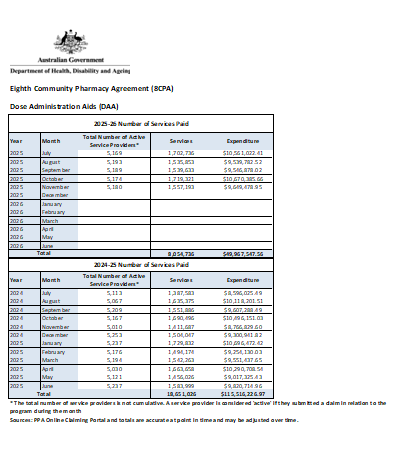
Eighth Community Pharmacy Agreement (8CPA) Community Pharmacy Programs dataset
This publication includes data about Community Pharmacy Programs funded under the Eighth Community Pharmacy Agreement (8CPA). -
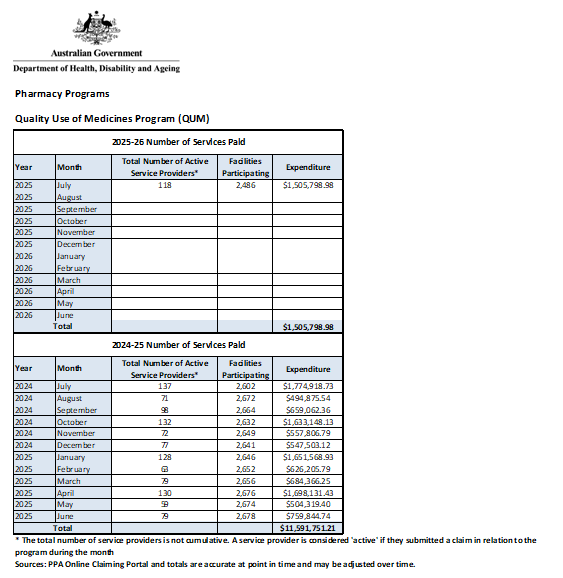
Medication Management Review Programs dataset
This publication includes data about Medication Management Review Programs including Home Medicines Review, Residential Medication Management Review and Quality Use of Medicines. -
 5:15
5:15Funding changes for NDIS supports – Safeguards for high support needs participants – Auslan
Learn how the new NDIS plan variation pathway for high supports needs participants will work. -
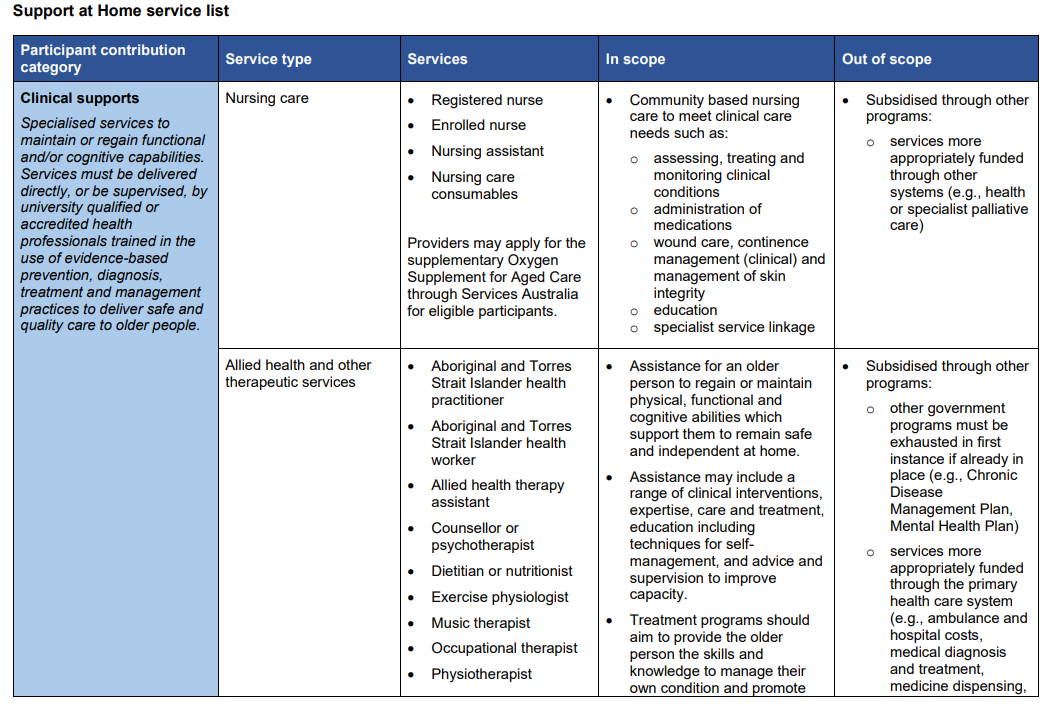
Support at Home service list
Support at Home includes a defined service list. The service list provides guidance on the services for which Support at Home funding can be used. -

National Cervical Screening Program – What happens when my healthcare provider collects my sample
This is a visual guide to help people understand the process when they choose to have a healthcare provider collect their Cervical Screening Test sample. -

Workforce strategy
Our workforce strategy builds capability and prepares our workforce for the future, ensuring we have the right people, in the right place, at the right time.